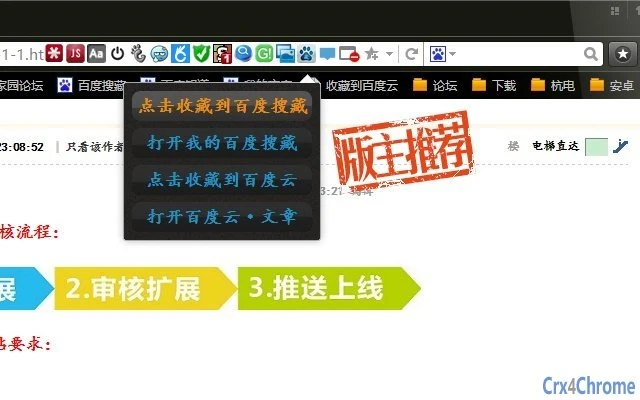

Fast Web Saving with Baidu Tools
Overview
The software is designed to streamline the process of saving web content using Baidu’s “Baidu Souchang” and its newer Baidu Cloud collection features. It aims to reduce the number of steps required to save a webpage by enabling users to do so with just three clicks. This functionality is particularly beneficial for individuals who frequently collect articles, links, or resources online and want to maintain an organized digital library. The tool supports quick access to the Baidu Souchang homepage and the Baidu Cloud · Articles page, enhancing workflow continuity for users who rely on these services.
Target users include professionals, students, and general internet users who regularly engage with Baidu’s ecosystem. The software is especially useful for those who prefer centralized content management and value efficiency in digital organization. While the developer is not specified in the provided information, the application appears to be built with a focus on simplicity and integration with existing Baidu services.
Real-world usage scenarios include saving research materials, curating reading lists, or archiving reference links during academic or professional work. The application’s minimal interaction requirement suggests it is optimized for daily use without disrupting workflow. It serves as a lightweight utility for users already invested in Baidu’s suite of tools.
Key Features & Capabilities
- One-Click Baidu Souchang Integration – Users can save any webpage to Baidu Souchang with minimal interaction, reducing the process to just three clicks.
- Baidu Cloud Collection Access – Direct navigation to Baidu Cloud’s article section, allowing quick access to saved content stored in the cloud.
- Quick Access to Souchang Homepage – Instantly open the Baidu Souchang dashboard, enabling users to review and manage their saved items efficiently.
- Seamless Workflow Integration – Designed to work directly within the browser environment, minimizing context switching and maintaining focus.
- Lightweight Desktop Utility – Built to operate with minimal system impact, ideal for users who prioritize performance and simplicity.
These features are particularly useful in scenarios such as academic research, content curation, or personal knowledge management. By reducing the number of steps required to save or retrieve content, the software enhances productivity for users who rely on Baidu’s services. The tool does not require complex setup, making it accessible to users of varying technical skill levels.
User Interface, Workflow & Performance
The user interface is designed with simplicity and efficiency in mind. Navigation is straightforward, with clearly labeled actions for saving content and accessing Baidu’s services. The layout avoids clutter, focusing only on essential functions to minimize user distraction.
Workflow efficiency is a key strength, as the application enables users to save web content with just three clicks—significantly faster than manual navigation through Baidu’s website. This streamlined process supports rapid content capture, especially when dealing with multiple sources in a short timeframe.
Performance details were not specified by the developer. However, the software is described as a lightweight desktop utility, suggesting it operates with minimal CPU and memory usage. The developer did not provide additional system requirements or resource consumption data. Stability is assumed to be consistent with standard desktop applications, but specific observations are not available.
Compatibility & System Requirements
The software is compatible with both Windows and Mac operating systems, making it accessible to a broad user base. The version number and installation size were not provided in the available information.
Exact system requirements were not listed. Compatibility information is limited to the supported platforms. Users should ensure their system meets standard desktop application requirements for smooth operation. The developer did not specify hardware or software prerequisites beyond OS support.
Pros and Cons
Pros
- Reduces saving steps to just three clicks
- Direct access to Baidu Souchang and Baidu Cloud · Articles
- Designed for efficiency and minimal user effort
- Lightweight and optimized for daily use
- Free to use with no cost barrier
Cons
- No information on system requirements or resource usage
- Developer background not disclosed
- Version and file size details missing
- Compatibility beyond Windows and Mac not confirmed
- Limited functionality outside Baidu’s ecosystem
FAQ Section
Is this software compatible with both Windows and Mac?
Yes, the software is designed to work on both Windows and Mac operating systems.
Is the software free to use?
Yes, the software is available at no cost to users.
Does the software require an internet connection?
Yes, since the software interacts with Baidu’s online services, an active internet connection is required for full functionality.
Can I use this tool without a Baidu account?
While the software supports Baidu Souchang and Baidu Cloud features, a valid Baidu account is likely required to save or access content through these services.
Are updates automatically provided?
Information about update mechanisms was not provided. Users should check the official source for the latest version.
Final Thoughts
This desktop utility offers a focused and efficient solution for users deeply integrated into Baidu’s digital ecosystem. Its ability to save web content with minimal interaction and provide direct access to key pages significantly improves workflow efficiency. The free availability and lightweight design make it accessible to a wide range of users, particularly those who value speed and simplicity in content management.
While some details such as system requirements, version, and file size are missing, the core functionality remains clear and purpose-driven. The software excels in its niche—streamlining Baidu-related tasks for power users and casual browsers alike. For those already using Baidu Souchang or Baidu Cloud, this tool provides a tangible productivity boost.
Download Baidu Souchang Tool now







